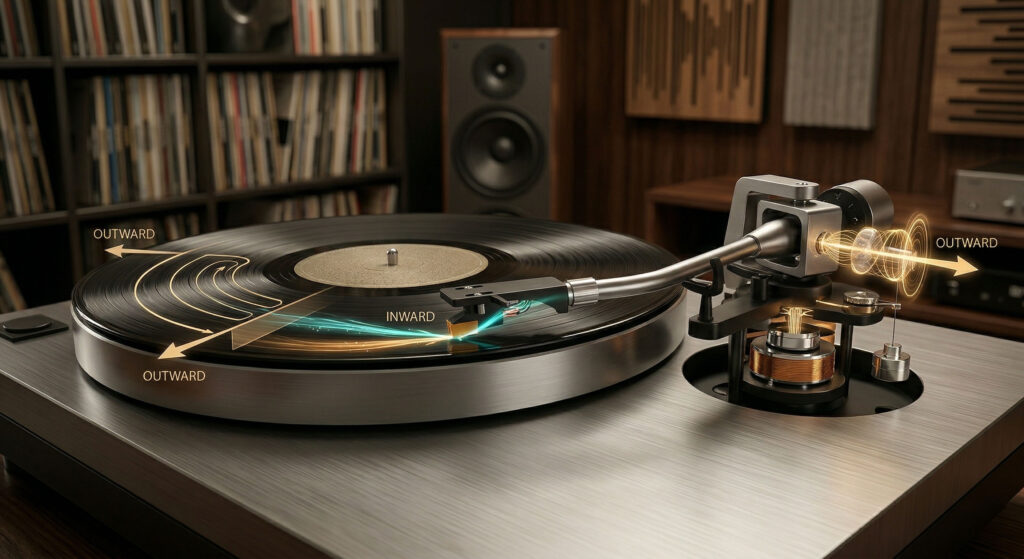
As a tonearm sweeps inward across a spinning record, geometry and friction create a force that pulls the stylus toward the center of the record — pressing harder against one groove wall than the other. Anti-skate applies a small counteracting outward force to keep the stylus centered in the groove, touching both walls equally. Without it: uneven groove wear, channel imbalance, and distortion on inner grooves. Set it to the same number as your tracking force — that’s the starting point.
Anti-skate is one of those record player adjustments that gets mentioned in every setup guide but rarely explained clearly. The dial is there, the manual says “set it to match tracking force,” and most people do exactly that without understanding why — or what happens when it’s wrong. Understanding the physics behind anti-skate makes it a much more satisfying adjustment to dial in by ear.
Why the Tonearm Always Wants to Skate Inward
A pivoted tonearm sweeps across a record in an arc — not a straight line. The geometry of this arc creates an important consequence: as the stylus tracks the groove, friction between the stylus and groove wall generates a force along the cantilever that has a component pointing inward, toward the spindle. This is skating force.
Three factors combine to create it: the offset angle of the headshell (the slight forward tilt that improves cartridge alignment), the inward arc of the tonearm’s path, and the friction between stylus and groove. Remove any one of them and skating force would disappear — but all three are necessary for good cartridge alignment and groove tracking. The skating force is an unavoidable consequence of how a pivoted tonearm works.
What Wrong Anti-Skate Actually Sounds Like
Anti-skate errors have specific, identifiable sonic signatures. Recognizing them by ear is the most reliable way to fine-tune the setting beyond the initial “match tracking force” starting point.
Play a vocal recording where the singer has prominent “s” and “sh” sounds. Close your eyes and listen carefully. With headphones or a well-separated stereo system, a clear difference in sibilance harshness between left and right channels indicates the stylus is being pushed toward one groove wall. Too little anti-skate pushes toward the inner wall — right channel goes harsh. Too much pushes toward the outer wall — left channel goes harsh. When both channels sound equally clean and balanced, the anti-skate is correct.
How to Set Anti-Skate on Your Record Player
What You’re Listening for — Fine-Tuning Guide
Record Players With Fixed Anti-Skate
Many record players — including several in the Arkrocket range — have anti-skate set at the factory and offer no user adjustment. This is not a limitation. The tonearm, cartridge, and anti-skate mechanism are designed and calibrated as a matched system. Factory-set anti-skate on these units is already optimized for the built-in cartridge at the recommended tracking force.
If your record player has no anti-skate adjustment, the factory setting is correct for normal use with the supplied cartridge at the recommended tracking force. There is nothing to adjust. If you experience channel imbalance or inner groove distortion, the cause is more likely a dirty stylus, incorrect tracking force, or a cartridge alignment issue than the anti-skate setting — which you cannot change in any case.
Do not attempt to add anti-skate force manually (tape, weights, or any other modification). These modifications apply imprecise, uneven force and are more likely to worsen playback than improve it.
A common test for anti-skate is to place the stylus on a completely blank, grooveless record and observe whether the tonearm drifts inward (too little) or outward (too much) or stays still (correct). This test is informative but imperfect — the skating force in a real groove is different from skating force on a blank surface, because groove friction generates part of the skating force. Use the blank-record test as a rough sanity check, not as a precision calibration tool. Your ears on a real record are more reliable.
Anti-skate is the setup adjustment that most people set once and forget — but it rewards attention. Start at the same value as your tracking force, then listen for channel imbalance on vocal sibilance, particularly in the inner grooves. Small adjustments make a real and audible difference to stereo image width, channel balance, and inner groove clarity. On a record player with a fixed anti-skate, trust the factory calibration and focus on keeping the stylus clean and the tracking force correct. Anti-skate only does its job when those fundamentals are right first.
Interested in the products mentioned? Shop Arkrocket directly:
Browse Arkrocket Record Players →