Arkrocket Huygens Record Player Setup Guide
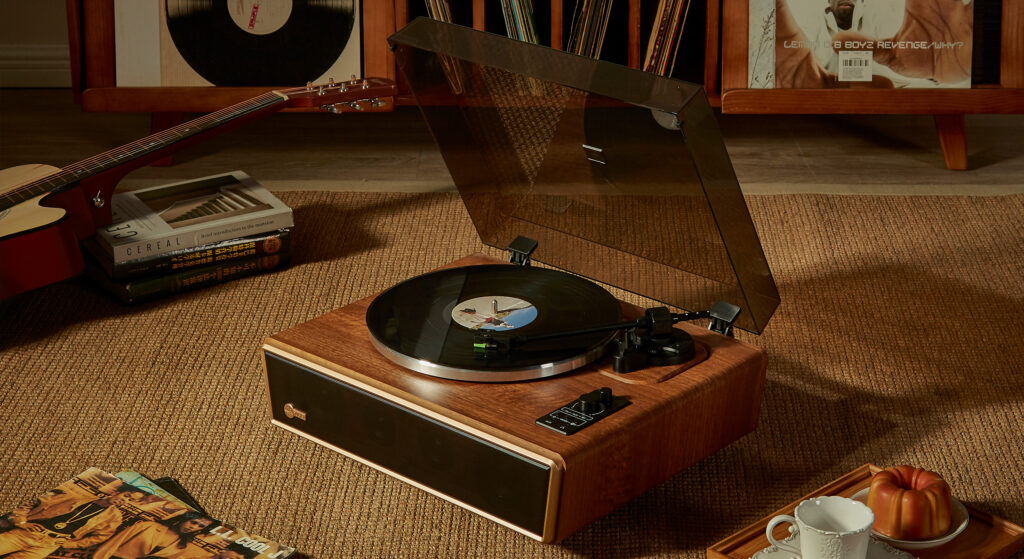
This guide covers the complete setup of the Arkrocket Huygens from unboxing to first play. The Huygens is an all-in-one system — four built-in speakers, 30W output, full Bluetooth in/out, and triple shock-absorption. Setup takes approximately 15 minutes.
What’s in the Box
| Item | Qty |
|---|---|
| Arkrocket Huygens turntable unit | 1 |
| 45 RPM adapter (centre insert) | 1 |
| Felt platter mat | 1 |
| Drive belt | 1 |
| Power cable | 1 |
| 3.5mm aux cable | 1 |
| AR-N60 cartridge (pre-installed) | 1 |
| Stylus guard (on cartridge) | 1 |
Step 1 — Choose the Right Location
Place the Huygens on a solid, level surface. Because it has four built-in speakers, vibration management is handled internally by the triple shock-absorption system — but the surface still needs to be stable. Avoid placing it directly on hollow wooden floors or thin shelves that flex underfoot.
Check level using a spirit level or phone app placed on the platter. Adjust the turntable’s rubber feet until level in both axes. An unlevel surface causes tonearm drift and skipping.
Step 2 — Install the Belt
The Huygens ships with the belt packed separately from the platter to prevent stretching during transit.
1. Remove the platter by lifting it straight up off the centre spindle. Set it upside down on a soft cloth.
2. Loop the belt around the inner rim groove of the platter. It should sit evenly with no slack.
3. Hold the platter over the turntable in its normal position. Reach through the access hole in the platter and hook the loose end of the belt onto the motor spindle — a pen or pencil through the hole makes this easier.
4. Lower the platter onto the centre spindle. Spin it slowly by hand — the belt should move smoothly without slipping or bunching.
Step 3 — Place the Felt Mat
Lay the felt platter mat flat on the platter. Smooth it out so it lies flat with no wrinkles or folds. The centre hole aligns with the spindle.
Step 4 — Remove the Stylus Guard
The AR-N60 cartridge ships with a plastic clip protecting the stylus tip. Grip the clip by its sides and slide it forward to remove. Keep it stored somewhere safe — useful for protecting the stylus during transport or storage.
Step 5 — Set Tracking Force to 3.5g
This is the most important setup step. The AR-N60 cartridge requires 3.5g tracking force. Incorrect tracking force causes skipping, distortion, and record damage.
1. Set the anti-skate dial to 0.
2. Release the tonearm from its rest. Rotate the counterweight (rear of tonearm) until the arm floats level — parallel to the platter surface, not dipping or rising.
3. Without moving the counterweight itself, rotate only the outer dial ring until it points to 0.
4. Rotate the entire counterweight (both dial and weight together) toward the front of the tonearm until the dial reads 3.5.
5. Set the anti-skate dial to 3.5 to match.
For maximum accuracy, verify with a digital stylus force gauge. See the full tracking force guide for photos of each step.
Step 6 — Connect Power and Select Input
Connect the power cable and power on the unit. The Huygens has multiple input modes — press the mode button to cycle between them:
| Mode | Use For |
|---|---|
| Vinyl / Turntable | Playing vinyl records through the built-in speakers |
| Bluetooth IN | Streaming from your phone/tablet to the Huygens speakers |
| AUX IN | Wired connection from phone or other device via 3.5mm |
For playing vinyl, select Vinyl / Turntable mode.
Step 7 — Pair Bluetooth (Optional)
To stream vinyl wirelessly to an external Bluetooth speaker or headphones (Bluetooth OUT):
Put your Bluetooth device into pairing mode. On the Huygens, hold the Bluetooth button until the indicator flashes. Select “Arkrocket Huygens” from your device’s Bluetooth menu. Once paired, vinyl audio streams wirelessly to the external device.
To stream from your phone to the Huygens speakers (Bluetooth IN):
Press the mode button to select Bluetooth IN mode. On your phone, go to Bluetooth settings and select “Arkrocket Huygens” from available devices. Audio from your phone now plays through the Huygens’ four built-in speakers.
Step 8 — First Play
Set the speed selector to 33⅓ for a standard LP (or 45 for a 7″ single). Place the record on the platter over the centre spindle. Set volume to around 40%. Using the cueing lever, lower the tonearm gently onto the outer groove of the record. The music should begin within one rotation.
No sound? Check that the mode is set to Vinyl/Turntable, not Bluetooth IN. Confirm the stylus guard has been removed. See our no-sound troubleshooting guide.
Huygens Setup Checklist
| Step | Done? |
|---|---|
| Unit placed on level, stable surface | ☐ |
| Belt installed on platter and motor spindle | ☐ |
| Felt mat placed flat on platter | ☐ |
| Stylus guard removed | ☐ |
| Tracking force set to 3.5g | ☐ |
| Anti-skate set to 3.5 | ☐ |
| Power connected and unit powered on | ☐ |
| Mode set to Vinyl/Turntable | ☐ |
| Speed set correctly for record type | ☐ |
Watch: Arkrocket Huygens Unboxing and Setup
See also: How to Set Tracking Force · No Sound Troubleshooting · Record Skipping Fix · Cassini Setup Guide
← Back to Fix & Setup